


Tizi Modern Home & Room Design
4.2240.00 Reviews
App Specs
- Version
- 2.1.2
- Updated On
- License
- Free
- Downloads
- 10,000,000+
- Developer
- Tizi Town Games
- Categories
- Educational
- Platform
- Android
Screenshots



 Analysis by AppCompare
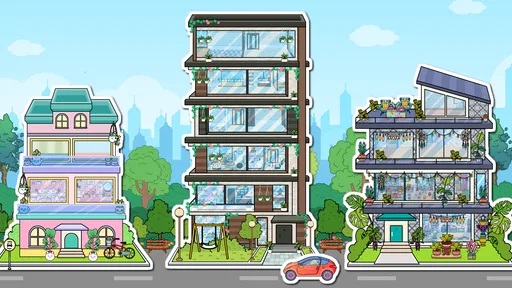
I like the idea of a home-design game best when it gives me room to experiment without turning every choice into a serious renovation decision. Tizi Modern Home & Room Design is aimed at that relaxed, creative mood: it is an educational game from Tizi Town Games where the main appeal is shaping a modern home with furniture and room decor. I would treat it as a casual design activity rather than a practical planning tool, which makes a difference if you are hoping to measure a real room or shop from an exact floor plan.
Who will enjoy this kind of design play
The game is a natural fit for children and anyone who enjoys arranging rooms, trying color combinations, or making up a home’s story as they go. Its Everyone age rating makes it broadly accessible, and the free download is an easy way to see whether the decorating loop suits you. I would also recommend it to a parent looking for a low-pressure creative activity: a child can focus on visual choices without needing interior-design knowledge or a complicated set of instructions.
It is less suited to someone who wants a precise room planner, realistic renovation estimates, or a catalog tied to products they can buy. A dedicated home-planning tool is a better choice when accurate dimensions and practical furnishing decisions matter. This game is more about imagination and visual play than getting a build-ready plan.
How I would use it in an ordinary day
For me, the best moment to open a game like this is a short break when I want something more hands-on than scrolling but do not have the energy for a demanding game. I might pick a room, settle on a simple theme, then try a few furniture and decor combinations before deciding which one feels most welcoming. That small constraint—choosing a theme first—helps keep the activity from becoming random tapping and gives the finished room a clearer identity.
There is also a useful way to make the decorating feel more intentional: decide what the room is for before you start. A quiet reading corner, a bright shared living space, or a bedroom with a calmer feel each suggests different choices. Even if the result stays purely virtual, thinking about how a room should feel gives the creative task a satisfying direction. I would not rely on the game to tell me whether a real layout will fit, but it can be a pleasant prompt for exploring styles.
What to expect from a free game
The game is free to install and has in-app purchases at $1.99 per item. That is the purchase information I can use to judge its cost: I would check the purchase options in the app before handing it to a child or deciding to spend, and I would not assume that every item or design choice is included at no cost. The game’s average rating is 4.5 from around 25,000 ratings, with about 241 written reviews, and it has passed 10 million installs. Those figures suggest that many players have tried it, though popularity alone does not tell me whether its particular decorating style will suit you.
One practical way to keep spending in perspective is to try the free experience first and decide whether a purchase would add something you genuinely want. If a child will be playing, it is sensible to review purchase controls on the device beforehand. I would also avoid treating a purchase as a promise of a specific feature unless the in-app description makes that clear. The game’s current version is 2.0.4, and it runs on Android 7.0 or later; it is free, but purchases are part of the experience to keep in mind.
Worth Reading Before You Choose

EA SPORTS FC Mobile 26 Is a Bigger Football Game, but It Takes Time

Flipboard Shows What News Apps Must Do Beyond the Feed

Switching to Android Auto Means Rethinking Your Driving Routine

Google Calendar Makes a Crowded Week Easier to Manage

Ludo King Makes the Most of the Minutes Between Plans

Baby Panda World Brings Quick Play to Modern Phones, but Its Game Library Feels Busy
Unleashing Your Inner Designer
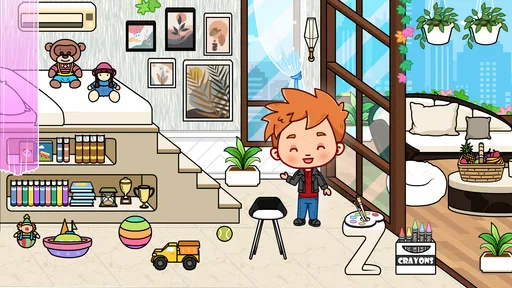
First things first, when you open the Tizi Modern Home & Room Design app, you're greeted with a vibrant and user-friendly interface. It’s like walking into a digital canvas that’s just waiting for your creative touch. The app gives you a variety of rooms to choose from, and each one is a blank slate for your wildest design ideas. It’s not just about slapping a few pieces of furniture down; it’s about crafting a space that feels like home.
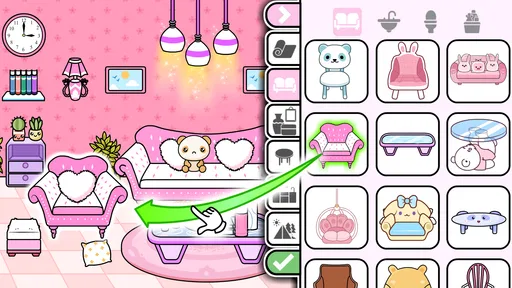
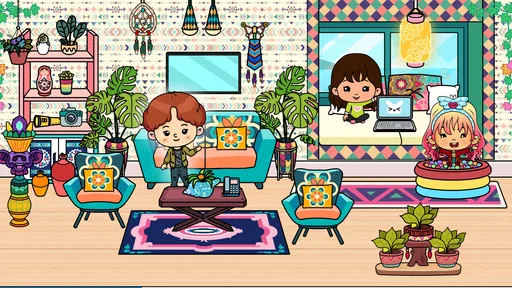
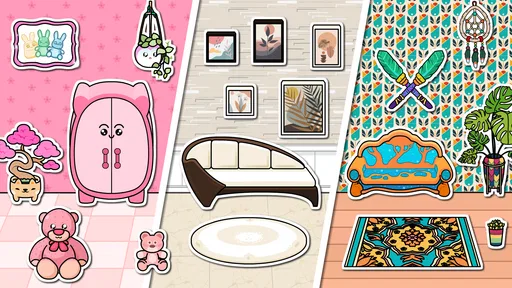
What I love most is the freedom it offers. You can select from a wide array of modern furniture pieces, trendy decor items, and even wall colors. Want a minimalist living room or a boho-chic bedroom? You’ve got it! The drag-and-drop feature makes it super easy to move items around until you find that perfect look. It’s almost therapeutic, really.
A Palette of Possibilities
The app doesn’t just stop at basic furniture. It dives deep into customization, allowing you to tweak every little detail. From the color of the cushions to the type of lighting, every choice is in your hands. And the best part? There’s no rush. Take your time to explore the different styles and combinations. It’s like playing dress-up, but for your house.
I was particularly impressed by the level of detail in the graphics. Each piece of furniture and decor item is beautifully rendered, giving you a realistic sense of how it would look in real life. Plus, the app stays updated with the latest design trends, so you’re always working with fresh, stylish options.
Real-Time Collaboration
One of the standout features of this app is its collaborative aspect. You can share your designs with friends or even bring in family members to help decide on the perfect layout. It’s a fantastic way to get feedback and bounce ideas around. Maybe your sister has the perfect eye for color, or your best friend knows what’s trending. Together, you can create something truly unique.
The app also offers a social component where you can browse through other users’ designs. This not only serves as great inspiration but also creates a sense of community. It’s like having a network of designers at your fingertips, all eager to share their latest creations and tips.
Bringing Your Designs to Life
Once you’ve perfected your design, the app allows you to save and even print your layouts. This feature is incredibly useful if you’re planning a real-life renovation or just want to keep a record of your creative journey. Plus, it’s always fun to look back and see how your style evolves over time.
For those who are serious about bringing their designs to life, the app provides links to purchase some of the furniture and decor items you’ve used in your design. It’s like having a personal shopping assistant that ensures your dream room becomes a reality.
Comparing it with other decorating games
Compared with puzzle games that reward quick answers or time-management games that keep the screen busy, this one is better suited to slow, visual tinkering. I enjoy that difference when I want to make choices at my own pace. Against other room-decorating games, its modern-home focus gives the activity a clear theme, but anyone looking for a wider mix of gameplay challenges may find a design-only session less engaging over time. The right comparison depends on what you want: a creative sandbox for room styling, or a game built around goals, levels, and more structured challenges.
A small workflow tip is to make one deliberate change at a time. If I change the wall color, furniture, and accessories all at once, it is harder to tell what improved the room. Trying a palette first, then placing larger pieces, then adding smaller accents makes the process feel more like designing and less like filling every open spot. It also makes it easier to stop when the room feels balanced rather than over-decorated.
Fairness, friction, and what I would check
For a free creative game, in-app purchases are worth keeping in view, especially if a child will be playing. The confirmed purchase price is $1.99 per item, but that alone does not tell me which items are paid or how much of the decorating selection is available without spending. I would make the first session a no-pressure trial, see whether the available choices are satisfying, and only consider a purchase if its contents are clear and appealing. That is a more reliable approach than assuming the game is either entirely free or dependent on spending.
I also would not use the game as a substitute for a measured floor-plan app. Visual arrangement can spark ideas, but a screen-based room design does not automatically establish real-world scale, traffic flow, or whether furniture will fit a particular home. For a child, that distinction is simple: it is play. For an adult planning an actual purchase, it is inspiration at most, and measurements still need to come from a practical planning method.
The game was released on Apr 29, 2024, and its age rating is Everyone. Those details make it straightforward to assess whether it fits a household’s basic age and device needs, while the minimum Android requirement means older devices should be checked before installing. I would still supervise spending choices for younger players, because an age rating is not a guarantee that every purchase decision is appropriate for every family.
Final Thoughts
All in all, the Tizi Modern Home & Room Design app is a delightful playground for anyone who loves interior design. Whether you’re a seasoned designer or just getting started, this app offers endless possibilities to express your style and creativity. It’s engaging, intuitive, and a whole lot of fun.
So, if you’re ready to unleash your inner designer and transform virtual spaces into stunning realities, give this app a go. Who knows? You might just discover a hidden talent for home design you never knew you had!
My verdict for a first try
I would recommend it to someone who wants an accessible, low-stakes way to play with room styling, particularly a young player or a family looking for a creative activity to share. I would skip it if my main goal were accurate renovation planning, guaranteed access to every decor choice without purchases, or a more varied game loop than arranging a home. Its strongest appeal is the freedom to make a space feel personal; its main trade-off is that this kind of open-ended design may not give every player a clear reason to return once they have tried the available combinations.
For a first session, I would choose one room and one mood, test a few arrangements, and stop before the design turns into clutter. If that process feels enjoyable, the game has found its audience. If I wanted a practical layout or deeper structured progression, I would look elsewhere rather than expecting this decorating game to do a different job.
Pros
- User-friendly interface enhances creativity.
- Wide variety of furniture and decor options.
- Regular updates with new design elements.
- Offline mode available for uninterrupted play.
- Encourages creativity and design skills.
Cons
- Limited customization for smaller rooms.
- In-app purchases can be costly.
- Occasional lag on older devices.
- Ads can be intrusive during gameplay.
- No option for sharing designs online.
FAQs for Tizi Modern Home & Room Design
What is Tizi Modern Home & Room Design?
Tizi Modern Home & Room Design is a creative app that allows users to design and decorate virtual rooms and homes with a wide variety of furniture, decor, and architectural elements. Ideal for interior design enthusiasts, it offers an interactive and immersive experience for users to express their creativity.
Is Tizi Modern Home & Room Design free to use?
While Tizi Modern Home & Room Design is free to download, it offers in-app purchases for premium features and items. These purchases can enhance the user experience by providing access to exclusive design elements, but the core functionality of the app can still be enjoyed without spending money.
Can I use Tizi Modern Home & Room Design offline?
Tizi Modern Home & Room Design requires an internet connection for downloading updates and accessing certain features, such as community designs and cloud saves. However, once the necessary elements are downloaded, users can access basic design features offline.
What devices are compatible with Tizi Modern Home & Room Design?
The app is available for both Android and iOS devices. It's optimized for smartphones and tablets, providing a seamless experience across different screen sizes. Ensure your device meets the minimum system requirements for smooth performance and functionality.
Is Tizi Modern Home & Room Design suitable for kids?
Yes, Tizi Modern Home & Room Design is suitable for kids and provides a safe environment for creative expression. The app is designed to be user-friendly and intuitive, making it accessible for younger audiences, though parental guidance is recommended for in-app purchases.


